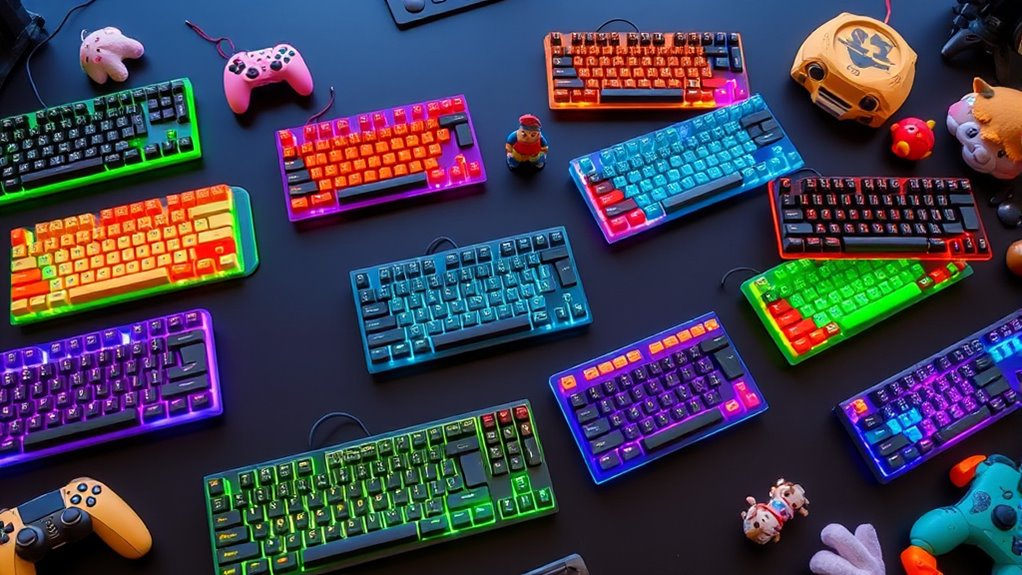

Choosing the right gaming keyboard for kids involves balancing fun features with durability and ease of use. The Redragon Mechanical Gaming Keyboard stands out for its customizable RGB lighting and hot-swappable switches, making it ideal for kids who enjoy personalized setups. The Rii RK100+ offers a colorful rainbow backlit aesthetic and a mechanical feeling, perfect for younger players who want a full-sized, versatile keyboard. Meanwhile, the GEODMAER 65% delivers a compact, portable design with backlit keys and solid durability, suiting kids who need something lightweight for gaming and schoolwork. Each option has distinct tradeoffs, from mechanical feel to size, that will influence who it’s best suited for.

Turn the school run and nap time into listening time
- Thousands of audiobooks, podcasts and originals
- Listen on your phone, tablet or Echo — also offline
- Cancel anytime
Complete the kit


Key Takeaways
- The Redragon keyboard excels in customization with hot-swappable switches and multiple macro options.
- The Rii RK100+ provides a vivid rainbow backlit aesthetic, but it’s not a true mechanical keyboard.
- The GEODMAER 65% is the most compact and portable, ideal for kids with limited desk space or on-the-go needs.
- Tradeoffs include limited switch options on the Redragon, a non-mechanical feel on the Rii RK100+, and fewer keys on the GEODMAER.
- Choosing depends on whether kids prioritize customization, visual appeal, or portability.
| Redragon Mechanical Gaming Keyboard Wired, 11 Backlit Modes, Hot-Swappable Red Switch, Anti-Ghosting, Double-Shot PBT Keycaps |  | Best Overall for Customization and Durability | Backlit Modes: 11 | Switch Type: Red Linear | Keycaps: Double-Shot PBT | VIEW ON AMAZON | See Our Full Breakdown |
| Rii RK100+ Rainbow LED Backlit Wired Mechanical Feeling Gaming Keyboard |  | Best for Visual Appeal and Versatility | Dimensions: 17.1 x 5.3 x 0.9 inches | Keys: 105 keys | Backlight: Rainbow with breathing light | VIEW ON AMAZON | See Our Full Breakdown |
| GEODMAER 65% Wired Gaming Keyboard with Backlit, Compact Anti-Ghosting 68 Keys for PC and Laptop |  | Best Compact and Portable for On-the-Go Kids | Design: 65% compact, mini size | Connection: Wired via Type-C cable | Keys: 68 keys, anti-ghosting | VIEW ON AMAZON | See Our Full Breakdown |
| kids gaming keyboard | Keys |
|---|---|
| Redragon Mechanical Gaming Key | — |
| Rii RK100+ Rainbow LED Backlit | 105 keys |
| GEODMAER 65% Wired Gaming Keyb | 68 keys, anti-ghosting |
More Details on Our Top Picks
Redragon Mechanical Gaming Keyboard Wired, 11 Backlit Modes, Hot-Swappable Red Switch, Anti-Ghosting, Double-Shot PBT Keycaps
The Redragon Mechanical Gaming Keyboard stands out for its customizable backlit modes and hot-swappable switches, making it ideal for kids who enjoy tinkering with their setup. Compared with the Rii RK100+, it offers a more tactile mechanical feel and greater durability thanks to its double-shot PBT keycaps. However, its single switch type—red linear—limits options for kids who might prefer a different feel. Its anti-ghosting tech ensures reliable key presses during fast-paced gaming, making it a resilient choice for active young gamers. The software for lighting effects is somewhat limited, which could be a drawback for kids seeking extensive customization.
Pros:- Customizable backlit modes for personalized ambiance
- Hot-swappable switches allow easy customization and maintenance
- Anti-ghosting ensures reliable key presses during intense gaming
Cons:- Color of backlight cannot be changed, only brightness and speed
- Limited to red switch type, no other options available
- Software for backlight effects may have limited customization
Best for: Kids who want a durable, customizable mechanical keyboard with a focus on longevity and gaming performance
Not ideal for: Children who prefer a non-mechanical feel or need a simpler, plug-and-play setup
- Backlit Modes:11
- Switch Type:Red Linear
- Keycaps:Double-Shot PBT
- Anti-Ghosting:Yes
- Macro Support:Yes
- Number of Multimedia Keys:12
Our verdict“A highly customizable, durable mechanical keyboard ideal for kids interested in gaming and personalizing their setup.”
Rii RK100+ Rainbow LED Backlit Wired Mechanical Feeling Gaming Keyboard
The Rii RK100+ offers a full-size layout with vibrant rainbow backlighting that appeals to younger gamers. It provides a mechanical feeling without the true mechanical switches, making it a good compromise for kids who want the aesthetic and feel of a mechanical keyboard without the higher price or complexity. Compared to the Redragon, it’s less durable and lacks switch customization, but its compatibility with multiple operating systems and multimedia keys make it versatile for both gaming and schoolwork. The backlight turns off after 10 minutes of inactivity, which might be a minor inconvenience for some users, and its bulkier design could be less suitable for smaller desks or travel.
Pros:- Vivid rainbow backlit with breathing light mode
- Full-size keyboard with multimedia keys for convenience
- Compatible with Windows, Linux, and Mac OS
Cons:- Not a true mechanical keyboard, only a mechanical feeling
- Backlight turns off after 10 minutes of inactivity
- Design may be bulky for some users
Best for: Kids who enjoy colorful visuals and need a versatile keyboard for gaming and productivity
Not ideal for: Children seeking a true mechanical keyboard or those who prefer minimalistic setups
- Dimensions:17.1 x 5.3 x 0.9 inches
- Keys:105 keys
- Backlight:Rainbow with breathing light
- Connectivity:Wired USB
- Compatibility:Windows, Linux, Mac OS, Android
Our verdict“A colorful, versatile keyboard with a mechanical feel, perfect for kids who want a fun and functional setup without high complexity.”
GEODMAER 65% Wired Gaming Keyboard with Backlit, Compact Anti-Ghosting 68 Keys for PC and Laptop
The GEODMAER 65% emphasizes portability with its compact size, making it ideal for kids who need a lightweight option for gaming and school. Its backlit keys are customizable, and the anti-ghosting feature supports basic gaming needs. The membrane construction offers durability and over 10 million keystrokes, but it doesn’t provide the tactile feedback of mechanical switches, which could be a drawback for tactile-focused kids. The limited number of keys restricts advanced gaming, but for casual players or those with space constraints, this model offers excellent value. Its wired connection via Type-C and no wireless option might be a consideration for some users.
Pros:- Compact and space-saving design
- Customizable backlit modes
- Durable with over 10 million keystrokes
Cons:- Membrane keyboard may lack tactile feedback
- Limited number of keys for advanced gaming
- No wireless option
Best for: Kids who need a portable, space-saving keyboard for gaming and schoolwork
Not ideal for: Children who want a full-size, tactile mechanical keyboard or wireless connectivity
- Design:65% compact, mini size
- Connection:Wired via Type-C cable
- Keys:68 keys, anti-ghosting
- Backlit:LED backlit with adjustable modes
- Material:UV coated keycaps
Our verdict“A portable, durable option suited for kids who prioritize space-saving design and daily versatility over tactile feedback.”

How We Picked
Our selection process focused on keyboards that are suitable for children’s gaming needs, emphasizing durability, ease of use, and engaging features. We prioritized models with adjustable lighting, reliable key mechanisms, and safety features, while considering affordability and size for younger users. Each product was evaluated for its compatibility with typical kid-friendly gaming setups, ensuring that the options offer a balance of fun and functionality without overwhelming complexity.
Factors to Consider When Choosing Kids Gaming Keyboards
Selecting a gaming keyboard for kids involves considering several factors such as size, durability, lighting, and feel. The best options balance fun aesthetics with practical features that withstand energetic use, while also fitting into smaller spaces or travel needs. Understanding what features matter most for your child’s gaming and daily use will help narrow down the right choice.Size and Portability
Kids often need a keyboard that fits comfortably on their desk or backpack. Compact 65% models like the GEODMAER are great for portability but may lack some keys needed for advanced gaming. Full-size options like the Rii RK100+ offer more keys and multimedia controls, but are bulkier. Consider your child’s space and whether they need a lightweight setup for school or travel.
Feel and Durability
Mechanical switches like those on the Redragon offer tactile feedback and durability, standing up to heavy use. Membrane keyboards, such as the GEODMAER, are less tactile but often more affordable and spill-resistant. Kids who prefer a tactile, clicky feel will favor mechanical options, while others may be comfortable with membrane designs.
Lighting and Aesthetics
Lighting adds fun and motivation for kids. Rainbow backlit options like the Rii RK100+ create a lively environment, while single-color backlit models like the Redragon provide a more subdued look. Adjustable lighting modes give some control over appearance, but consider whether the lighting is a priority for your child’s enjoyment.
Additional Features
Macro support, multimedia controls, and anti-ghosting are useful for gaming. The Redragon excels here with macro and anti-ghosting capabilities. For portability, look for models with durable keycaps and easy-to-clean designs. Also, check if the keyboard is compatible with your child’s devices, especially if they use multiple operating systems.
Frequently Asked Questions
Are mechanical keyboards good for kids?
Mechanical keyboards can be excellent for kids who want tactile feedback and durability. They tend to last longer and can improve typing accuracy, which is beneficial for gaming and schoolwork. However, they are often louder and more expensive than membrane options, so consider your child’s noise tolerance and budget before choosing mechanical switches.
Is backlighting necessary for kids’ gaming keyboards?
Backlighting adds visual appeal and can help kids see keys in low-light environments, making gaming more fun. While not essential, colorful or customizable lighting can motivate kids and make their gaming setup more engaging. For younger children, simpler lighting options may be sufficient, while older kids might enjoy more advanced effects.
Should I prioritize portability or full features?
If your child often moves between rooms or schools, a compact, portable keyboard like the GEODMAER makes sense. For kids who want extensive features like macro keys and multimedia controls, a full-size model such as the Rii RK100+ offers more functionality. Consider your child’s lifestyle and how they will use the keyboard most often.
Are non-mechanical keyboards worth it for kids?
Non-mechanical, membrane keyboards are generally more affordable and quieter, making them suitable for younger children or those new to gaming. They tend to have a softer feel and less tactile feedback but can still deliver acceptable performance for casual gaming. The choice depends on whether tactile feel and longevity outweigh cost and noise considerations.
What features should I look for in a kids gaming keyboard?
Key features to consider include size (for space and portability), durability (especially if the child is energetic), lighting (for fun and visibility), and compatibility with their devices. Additional controls like macro keys and multimedia shortcuts can enhance gaming experience, but simplicity might be preferred for beginners. Balancing these factors will help you find a suitable model.
Conclusion
For children who love customization and durability, the Redragon Mechanical Keyboard offers excellent value, though it’s best for older or more experienced young gamers. The Rii RK100+ appeals to kids who enjoy colorful visuals and a full-sized layout, making it ideal for casual gaming and schoolwork. The GEODMAER 65% suits kids who need a lightweight, portable option that doesn’t sacrifice durability, perfect for those with limited space or who are always on the move. Each choice aligns with different priorities, so consider your child’s preferences and gaming style when selecting the right keyboard.
Cold & flu season Picks
humidifiers
As an affiliate, we earn on qualifying purchases.